


Easy Invoice & Estimates Maker
4.2105.00 Reviews
App Specs
- Version
- 9.4.1
- Updated On
- License
- Free
- Downloads
- 50,000+
- Developer
- Lefage, LLC
- Categories
- Business
- Platform
- Android
Screenshots
 Analysis by AppCompare
When I need to send a polished invoice without opening a full accounting system, Easy Invoice & Estimates Maker is the kind of business app I reach for first. I found its purpose pleasantly narrow: it helps turn the basic details of a job into a professional PDF invoice, rather than trying to become an entire finance department. That focus makes it approachable for freelancers, tradespeople, consultants, and small operators who mainly need to bill customers quickly from a phone.
The app is free to install and is made by Lefage, LLC. It is available to users aged Everyone, runs on Android devices using version 7.0 or later, and the current release is 9.4.1. Its average rating sits at 4.2 from roughly a thousand ratings, with more than a hundred written reviews and over fifty thousand installs. Those figures suggest a useful, established tool without making it look like a heavyweight platform aimed at large companies.
How Easy Invoice & Estimates Maker fits into real mobile work
I find Easy Invoice & Estimates Maker most useful when a job is finished but the paperwork still needs to catch up. This section looks at how I fit it into that moment, from capturing the details while they are fresh to deciding when the document is ready to leave my phone. The next part follows the practical steps and handoffs that make a mobile invoice dependable.
A quick invoice is useful only when the connection cooperates
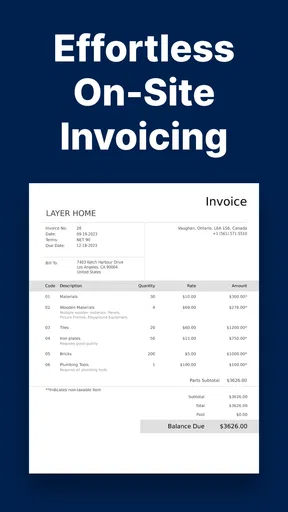
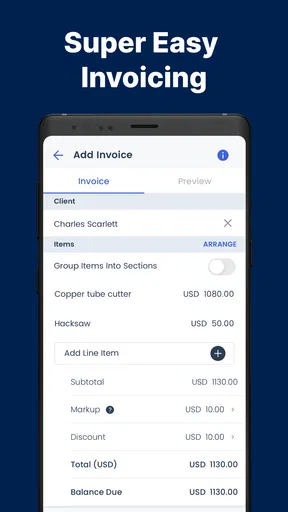
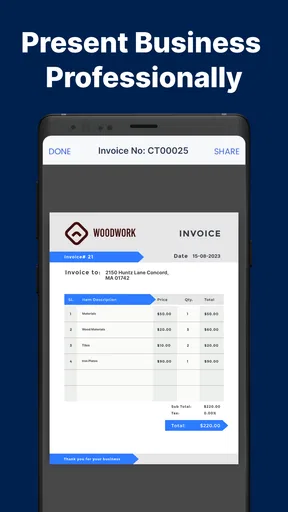
The central workflow is straightforward: enter the customer and job information, shape the document with an invoice template, and prepare a PDF that can be sent to the client. In my experience, the appeal is not advanced accounting; it is reducing the number of steps between finishing a small job and asking to be paid.
That workflow naturally includes network-dependent moments. Creating the document may feel like a local task on the phone, but sending a PDF, sharing it through an online service, or checking anything that relies on an external connection can become less predictable when reception is weak. I would treat the app as a mobile document tool rather than assume every part of the process works independently of the internet.
This distinction matters on a job site. Imagine a plumber finishing a repair in a building with poor reception. The practical approach is to collect the figures and customer details while the visit is still fresh, review the total carefully, and only then attempt to send the finished document when the connection is stable. If the final sharing step cannot happen immediately, the important work should at least be organized instead of reconstructed later from memory.
The best habit is to separate invoice preparation from invoice delivery. That small change prevents a weak signal from turning a completed job into an unfinished administrative task. It also makes the app more useful for people who move between workshops, homes, vehicles, and customer premises during the day.
Worth Reading Before You Choose

Flipboard Shows What News Apps Must Do Beyond the Feed

Switching to Android Auto Means Rethinking Your Driving Routine

Google Calendar Makes a Crowded Week Easier to Manage

Ludo King Makes the Most of the Minutes Between Plans

Baby Panda World Brings Quick Play to Modern Phones, but Its Game Library Feels Busy

ESPN’s Live Game View Makes Following Close Games Easier
Templates save more time than they first appear to
The templates are more important than the PDF label alone suggests. A repeatable layout means I do not have to reinvent the visual structure for every customer. Once I know where the business identity, customer details, work description, amounts, and payment information belong, checking an invoice becomes much faster.
For a freelancer with several similar services, the real advantage is consistency. A client should not receive a document that looks improvised simply because it was created on a phone. A familiar template also helps me notice omissions: if a line normally appears in a certain place and is empty, that becomes a prompt to check whether I forgot a service description or payment detail.
There is a trade-off, though. Template-based tools favor speed and clarity over the deep customization found in desktop invoicing suites. If your business needs elaborate tax rules, industry-specific compliance fields, inventory connections, recurring billing logic, or detailed financial reports, this app may feel too limited. It is strongest when the invoice itself is the main requirement.
Where mobile use is genuinely better than a desktop alternative
I would choose this app over a spreadsheet when I am away from a desk and need a presentable document immediately. A spreadsheet gives more control, but that control comes with formatting work, formula risks, and the temptation to keep editing the file instead of sending it. A dedicated invoice maker reduces that friction.
It is also more practical than writing an invoice in a word processor. Word-processing documents can look fine, but they often require manual alignment and repeated copying. A purpose-built invoice workflow is less likely to drift from one customer to the next. For a one-person business, that reduction in fiddling is valuable.
Compared with a full bookkeeping platform, the difference is more significant. Accounting software is better when I need a complete record of income, expenses, taxes, bank activity, payment status, and reports. Easy Invoice & Estimates Maker is better when I want a clean invoice or estimate without learning a larger system. Choosing between them depends on whether billing is the whole job or only one part of a wider financial process.
A realistic workflow for a freelancer or small service business
Consider a photographer who finishes a short event assignment. Before leaving, they can note the agreed service, any additional editing, and the final amount. Back at the car or studio, they can review the wording, choose a suitable template, and produce the PDF while the details are still accurate. If the network is reliable, the document can then be sent through the available sharing route.
The useful detail here is the review pause. I would not rush directly from entering the last amount to sending the file. On a small screen, a misplaced digit or incomplete description is easy to miss. I prefer to check the customer name, service lines, total, and contact details in that order. That takes less time than correcting an invoice after the client has already received it.
For recurring work, I would also keep descriptions specific rather than relying on vague labels such as “services.” A clear line makes the PDF easier for the customer to understand and makes a later conversation less awkward. The app can speed up document creation, but it cannot replace careful wording.
Estimates are useful before the work begins
The estimate side of the workflow is valuable for businesses that agree on a price before completing a job. It gives the customer something more formal than a text message and creates a clearer bridge between an expected cost and the later invoice.
I see this as especially helpful for repair work, design projects, home services, and independent consulting. An estimate can list the planned work in a way that reduces misunderstandings. The important discipline is to treat it as a planning document, not as proof that payment has already been requested. Once the work changes, I would review every line rather than simply reuse the earlier wording without thought.
This is another area where mobile convenience has a limitation. A phone is excellent for a short, clear estimate. It is less comfortable for a complicated proposal with many alternatives, long terms, or extensive supporting material. In that situation, a desktop document or a dedicated project proposal system may produce a better result.
What happens when sending fails
Connectivity problems are most frustrating at the final step. A document may be ready, but the customer may not receive it because the signal drops, a sharing service is unavailable, or the phone changes networks. I would avoid treating a failed send as proof that the invoice was delivered.
My recovery routine would be simple: check whether the PDF was actually created, keep the customer details visible, and retry only after the connection improves. If the app leaves the document ready for another attempt, that is much less disruptive than rebuilding it. I would also avoid repeatedly tapping a send action without checking the result, because that can create uncertainty about whether the customer received duplicates.
When a client is waiting, a brief message through whatever communication method is already working can explain that the invoice will follow. That is not a feature claim about the app; it is a sensible business fallback. The key is to preserve the prepared document and maintain a clear record of what was sent and when.
Be careful with duplicate documents and revised totals
Mobile recovery also creates a bookkeeping risk: duplicate PDFs with slightly different totals. If I edit an amount after a failed attempt, I would make sure the old version is not accidentally sent later. A consistent naming habit can help, such as including the customer and job reference in the file name when the workflow allows it.
I would also keep the final version separate from a draft estimate in my own records. A customer should not have to guess which document is current. The app makes producing documents easier, but version discipline still belongs to the person using it.
Using the app without wasting mobile data
For data-conscious users, the main practical question is not how often the app is opened but when network activity is needed. I would prepare the text and amounts in one focused session, avoid repeatedly regenerating the same document, and wait until a stable connection is available before trying to send it. That reduces unnecessary retries and makes the process less stressful on a limited mobile plan.
It is also sensible to avoid treating every preview as a reason to transmit or share a new copy. First review the content on the phone, then create the final PDF once the details are settled. This is a small workflow improvement, but it matters when working in areas with expensive or unreliable connectivity.
I would not choose the app on the assumption that it replaces a secure document archive or a complete business records system. Keep important copies in the storage and accounting workflow you already trust, especially if invoices must be retained for tax or contractual reasons. The app is a convenient creation point; it should not automatically become the only place where business history exists.
Privacy and practical phone habits
Invoices contain customer information, so I would use the same care here as with any business document. Avoid preparing a sensitive invoice while someone else can easily see the screen, double-check the recipient before sharing, and do not send a draft simply because it is the first PDF available.
A phone also makes accidental edits easier. I prefer to pause before tapping the final action, particularly when working one-handed or while moving between appointments. The convenience of mobile billing is real, but speed should not come at the cost of sending the wrong customer data.
Who should use it, and who should skip it?
I think Easy Invoice & Estimates Maker is a good match for independent workers who need professional-looking invoices without committing to a broad accounting subscription. It suits people who bill by project, visit, session, or simple service line and who value the ability to work from an Android phone.
It is also a reasonable starting point for a new business that has outgrown handwritten receipts or informal messages. The free entry point makes experimentation easier, although in-app purchases range from $5.49 to $499.99 per item, so I would review any paid option carefully before committing. The presence of optional purchases does not automatically make the app expensive, but it does mean the free installation should not be confused with every capability being free.
I would skip it if I need a comprehensive accounting environment. Businesses with several employees, complex tax handling, stock management, automated payment matching, or extensive financial reporting will probably be better served by software designed around those needs. I would also look elsewhere if my work depends on elaborate proposals rather than compact estimates and invoices.
My overall view of the connectivity trade-off
After using it as a focused billing tool, I see its greatest strength in the short path from job details to a shareable PDF. The app does not ask a small operator to build an entire accounting process before sending a basic bill. Templates, mobile access, and estimate creation make it practical for everyday service work.
The main caution is that connectivity shapes the last mile. A weak signal can delay delivery even when the document itself is ready, and the app should be used with a deliberate retry and record-keeping routine. I would prepare first, verify second, and send only when I can confirm the result.
For that reason, my recommendation is specific rather than universal: choose Easy Invoice & Estimates Maker if you want a focused Android invoicing companion and your business mainly needs clear PDFs and estimates. Choose a fuller accounting platform if billing is only one part of a larger financial operation. For the right user, its simplicity is an advantage, not a missing feature.
Overall, Lefage, LLC has produced a useful business app for people who need to look professional while working away from a desk. The free price and Everyone age rating make it easy to try, while the solid 4.2 average indicates that many users find the basic approach worthwhile. I would keep it in my mobile toolkit for straightforward billing, but I would pair it with a dependable storage and bookkeeping routine rather than expecting one small app to manage the whole business.
Pros
- Create professional invoices and estimates directly from your phone.
- Useful templates help speed up recurring billing and quoting tasks.
- Customer and item details can be saved for faster document creation.
- Suitable for freelancers
- contractors
- and small businesses on the go.
- Documents can be shared digitally without needing a desktop computer.
Cons
- Advanced accounting and inventory tools may be limited.
- Some features or templates may require an in-app purchase.
- Manual data entry can become time-consuming for larger catalogs.
- Tax settings may not suit every country or business requirement.
- A mobile screen can feel restrictive when editing detailed invoices.
FAQs for Easy Invoice & Estimates Maker
What is Easy Invoice & Estimates Maker used for?
Easy Invoice & Estimates Maker is designed to help freelancers, contractors, small businesses, and independent professionals create estimates, invoices, and receipts from a mobile device. During testing, the app’s main workflow was straightforward: enter customer and business details, add products or services, apply taxes or discounts, and generate a professional-looking document that can be shared with a client or saved for your records.
Can I customize invoices and estimates in Easy Invoice & Estimates Maker?
Yes, the app generally allows users to personalize important document details, including business information, customer data, item descriptions, prices, taxes, discounts, payment terms, and notes. Depending on the version and platform, customization options may also include logos, invoice numbering, currency, and document templates. It is worth checking the available settings before downloading if you need highly advanced branding or specialized accounting layouts.
Can invoices and estimates be sent directly to customers?
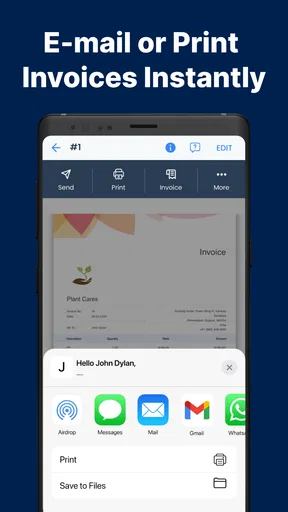
Easy Invoice & Estimates Maker is built for sharing documents conveniently from a phone or tablet. After creating an invoice or estimate, users can typically preview it and send it through email, messaging applications, or other sharing tools supported by the device. Many versions also allow documents to be saved or exported, making it easier to keep a copy for bookkeeping or send a PDF-style file to a customer.
Does Easy Invoice & Estimates Maker include payment tracking or accounting features?
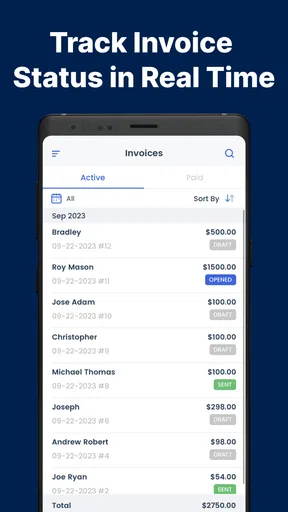
The app focuses primarily on preparing and managing estimates, invoices, and receipts rather than replacing full accounting software. It may provide useful tools such as marking invoices as paid, organizing customer information, reviewing document history, or monitoring outstanding amounts. However, users who require bank reconciliation, payroll, inventory management, detailed tax reporting, or integration with professional accounting platforms should verify the current feature list before relying on it for complete financial management.
Is Easy Invoice & Estimates Maker free to use, and is my information safe?
The app may offer a free version with basic invoicing tools while reserving certain templates, features, or unlimited document creation for a subscription or one-time purchase. Pricing and included functions can vary between Android and iOS releases, so review the store listing carefully. Before entering sensitive customer or business information, also check the app’s privacy policy, backup options, storage method, and permissions to understand how your data is handled.


